
Case Study
Humans don't think linearly —
but AI chat interfaces assume we do.
Creative work and research don't happen in a straight line. We jump between ideas, revisit what we found earlier, and slowly build on things over time. Most AI chat interfaces, though, treat every conversation like a one-way scroll.
This project explores how AI interfaces might better support the way people actually think — making it easier to go back, find useful moments, and build on what's already there instead of starting from scratch.
Role
Lead Designer
Team
5 Designers
Deliverable
Figma Prototype
Key Skills
UX Research · Interaction Design · Prototyping
Part of a series
This case study is part of UI for AI: an ongoing project led by Dan Saffer at Carnegie Mellon University, exploring new UI paradigms and interaction patterns for the age of AI. Follow along to see process, experiments, and future work.
Follow the ongoing work on Medium01 · The Problem
The cost of a conversation that can only move forward
The endless scroll — outputs accumulate with no way to navigate, revisit, or build on what came before.
AI chat interfaces assume conversations are meant to be read linearly and consumed once. Human workflows, however, are iterative, interruptible, and non-linear.
01
“I don’t know where that answer went”
Long threads make spatial memory useless. Good outputs disappear into the scroll.
02
“I have to start over every time I come back”
After stepping away, users must reconstruct context from scratch before moving forward.
03
“I’m writing the same prompt over and over”
Reliance on repeating prompts instead of building forward on what already exists.
04
“I know there was something useful in there”
Valuable outputs buried and forgotten inside the scroll, never acted upon.
“The result is a breakdown between how people think and how AI conversations are structured.”
02 · Research
Finding the friction
in the ‘infinite scroll’
How prior work approached non-linear thinking in AI.
Academic Research
paperCARE
Reframes chat-based AI from a reactive system into a collaborative partner, separating interaction into a conversation chat, a structured solution view, and a needs panel tracking user goals and constraints.
“Supporting clarity often requires layering structure around conversation, not adding more conversation itself.”
Academic Research
paperSensecape
Examines how people move fluidly between exploration and sensemaking. Rather than forcing a single sequential path, the system enables multiple levels of interaction as understanding evolves.
“Non-linear workflows benefit from interfaces that allow users to externalize and manipulate their thinking instead of relying on memory.”
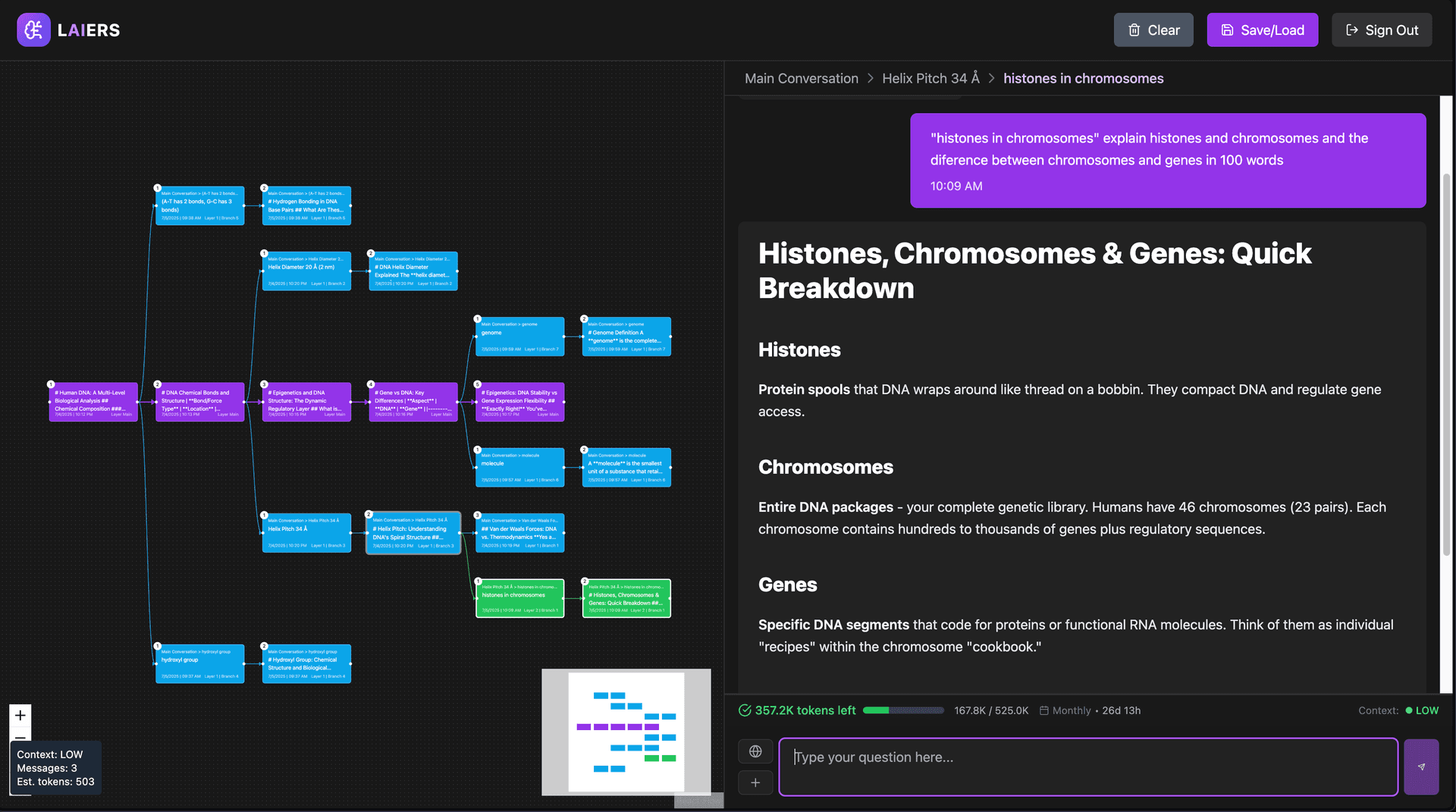
Adjacent System
LAIERS
A platform that reimagines AI conversations as spatial branching structures rather than linear chats. Each branch preserves conversational context, using color and spatial layout to communicate hierarchy and divergence.
“Expressiveness and approachability pull in opposite directions — non-linear thinking needs to be supported through lighter-weight interactions, not spatial complexity alone.”
Concept Testing
How three early concepts
pointed toward one clear direction
In early sketches, our team transformed our original idea into three distinct approaches and tested each individually with users.
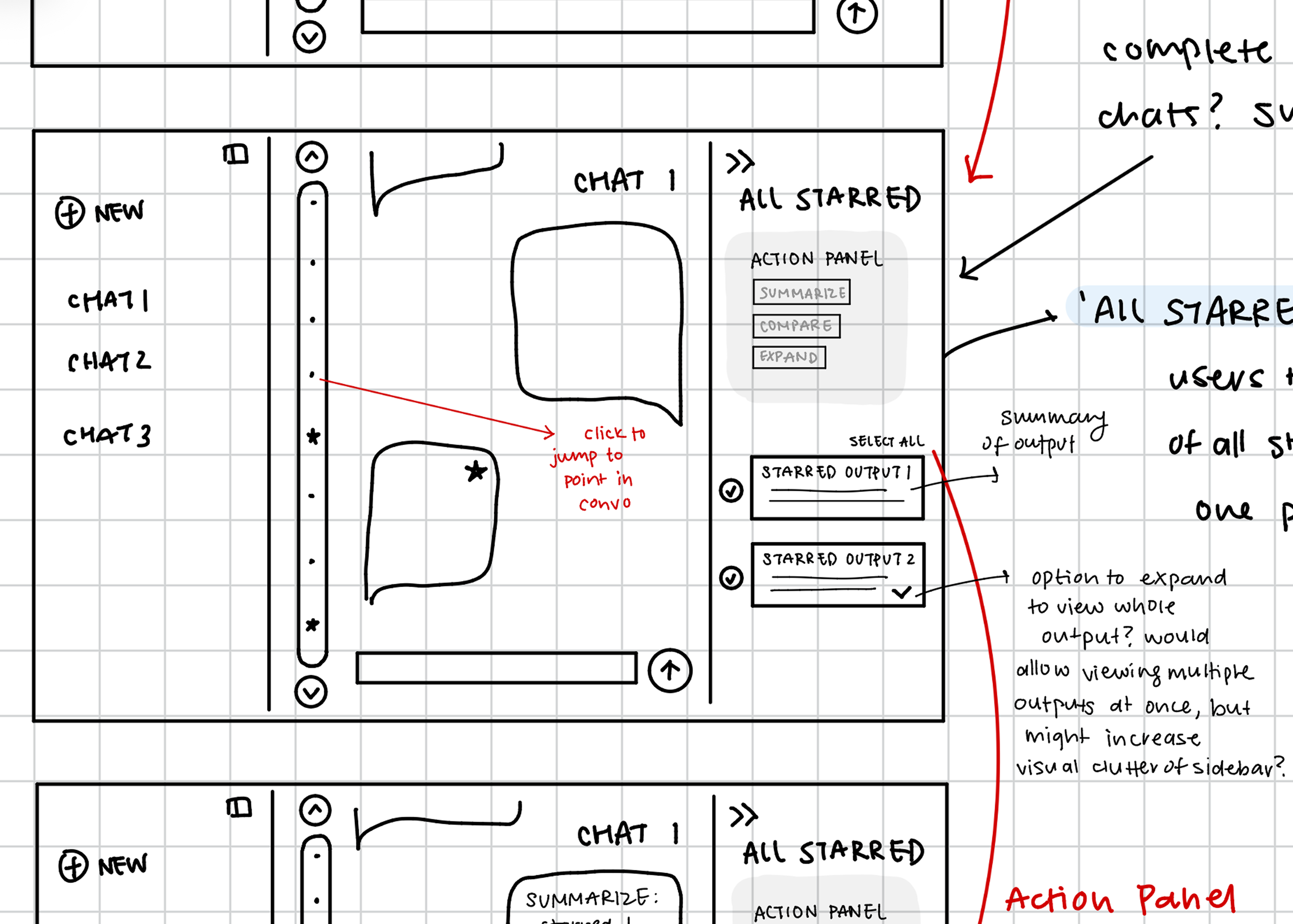
Timeline
Ranked 2ndA scroll-like bar for quick chat navigation, with stars representing saved moments.
Helped with recall, but felt less useful for users with light, short-session usage patterns.
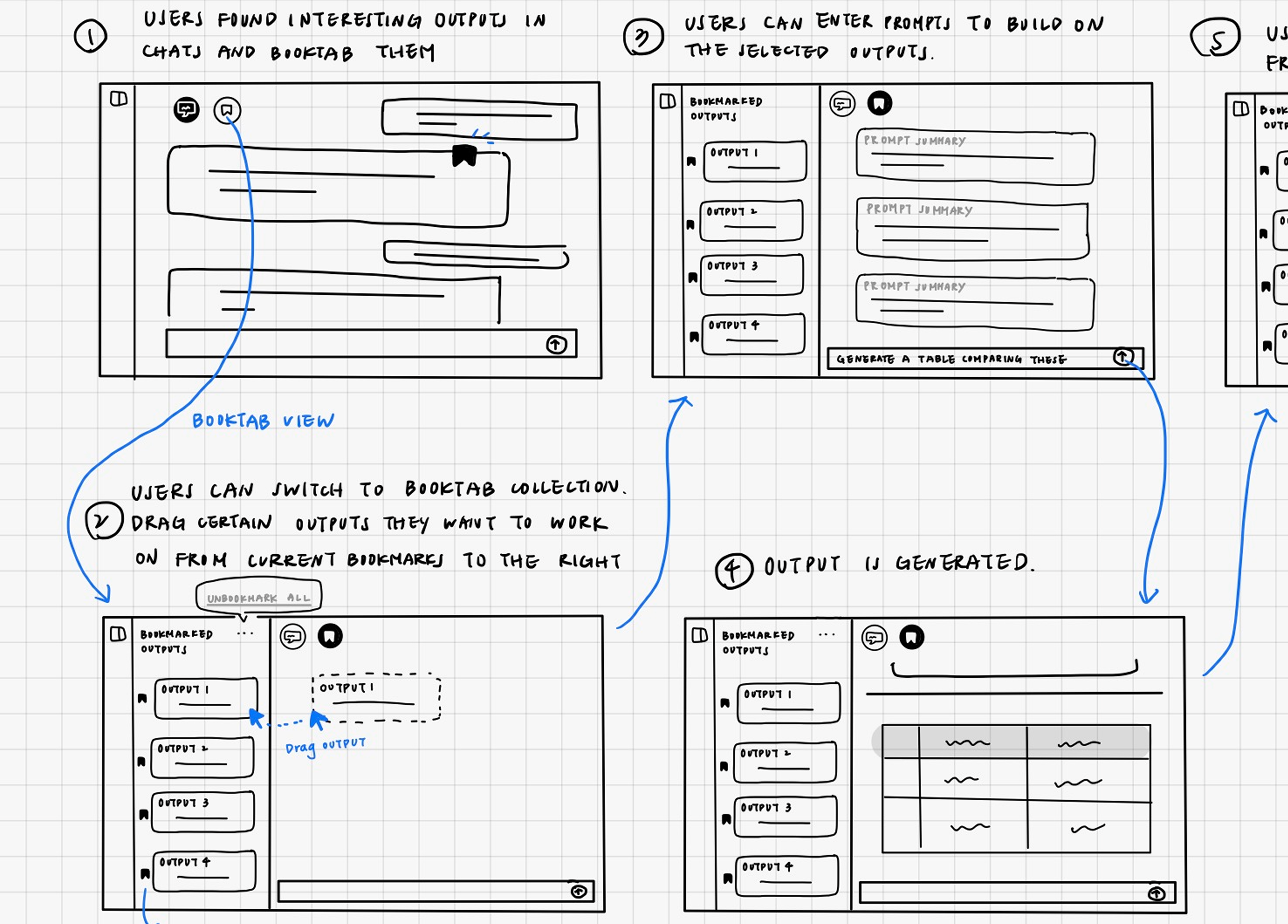
Bookmarking
Ranked 1stSaving and further operating on specific outputs directly within the conversation.
Immediately useful and intuitive across all user types.
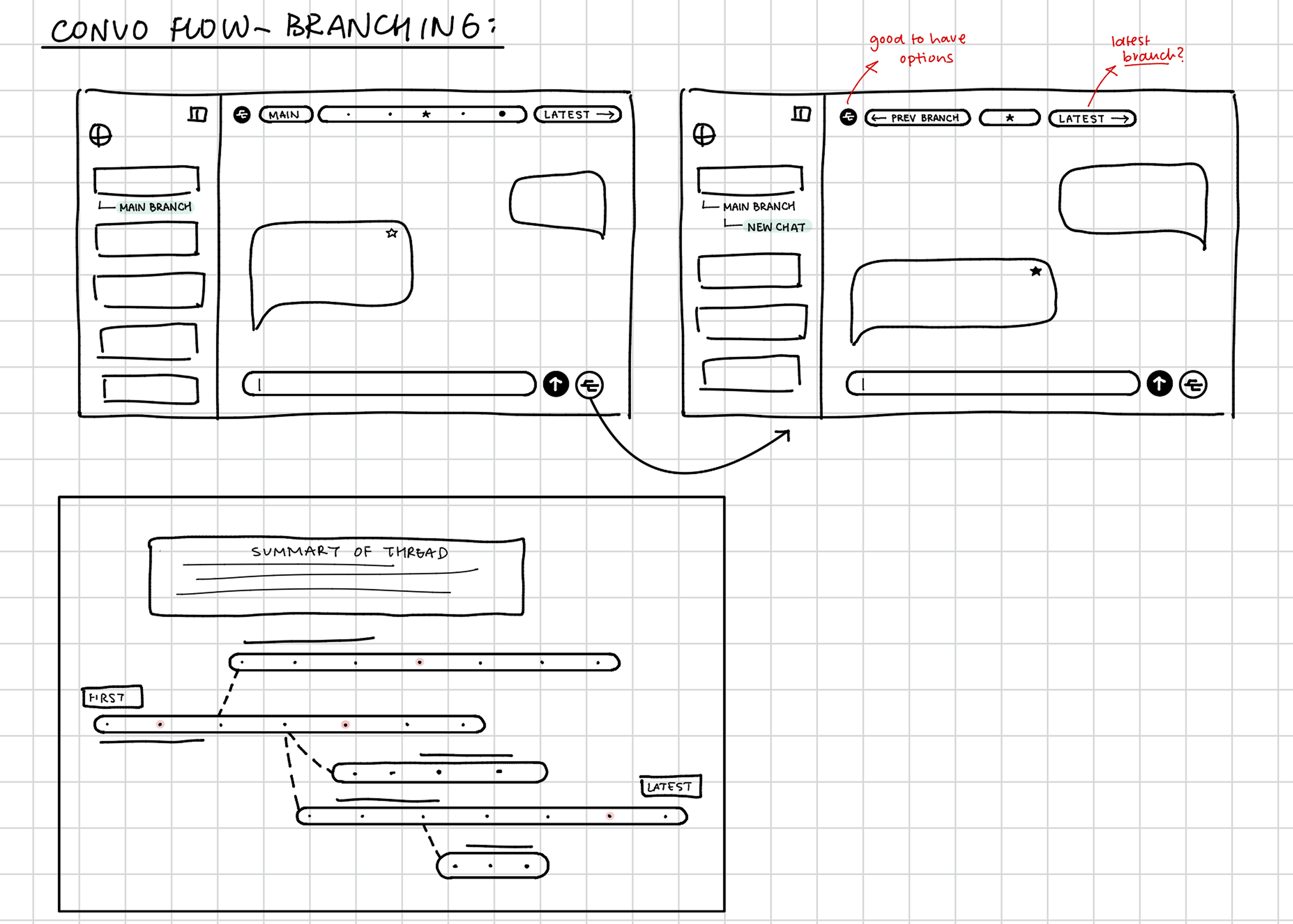
Branching
Ranked 3rdA flexible, non-linear tree-view of chat threads representing divergent thought paths.
Powerful but polarizing — felt overwhelming and unfamiliar for everyday use.
Synthesis
After testing all three concepts individually, we ran an affinity clustering session to consolidate what we heard across participants. The clearest signal: users' core struggle was retrieval, not generation. Scrolling and Cmd+F were common workarounds, but most users just re-asked the question instead of digging back through the chat.
Two user groups emerged: everyday users who wanted automation and quick recall, and power users who wanted depth and control.
The Bookmarking solution ranked first across both user groups, describe as intuitive, low-effort, and useful regardless of their session length. Timeline was helpful but felt less useful for everyday users who used chat as a one-off search tool. Branching appealed to power users but was too visually heavy for everyday use. The overlap pointed toward a single, integrated recall surface that took the navigation elements from the Timeline, the flexibility of Branching, and the simplicity of Bookmarking.
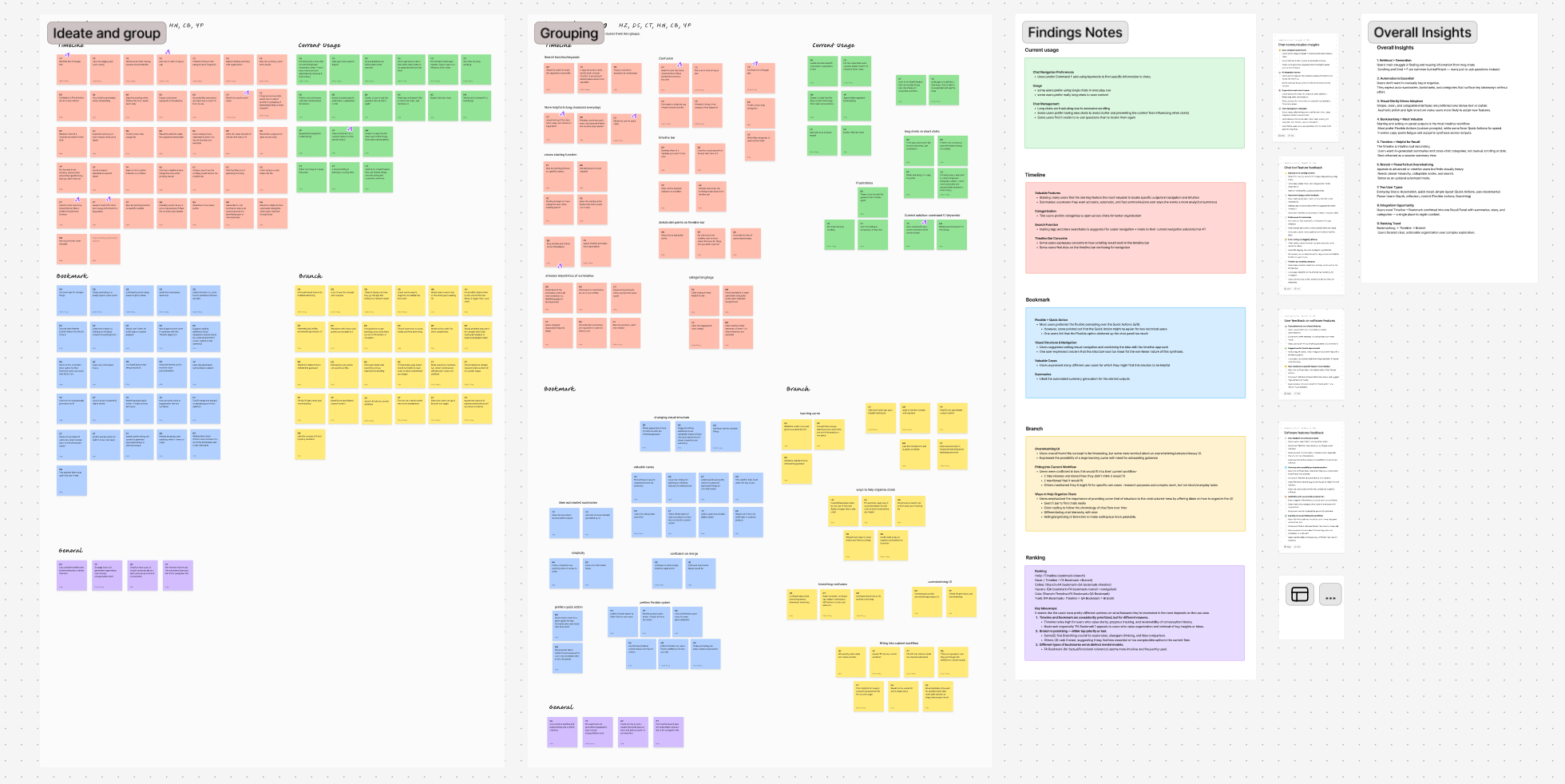
Affinity clustering on FigJam — round 1 concept testing findings across all participants
03 · The Solution
Reframing the chat
as a living workspace
Rather than treating AI chats as static transcripts, this project reframes them as spaces users can move through flexibly, revisit, and build upon over time. Our solution adds a layer of non-linear navigation and memory affordances onto an already familiar linear structure.
Bookmarking moments in a sea of text
The first element is a bookmarking system that allows users to save individual AI responses directly from the chat. These bookmarked outputs are not treated as detached artifacts, but as anchors to meaning — part of the conversation itself.
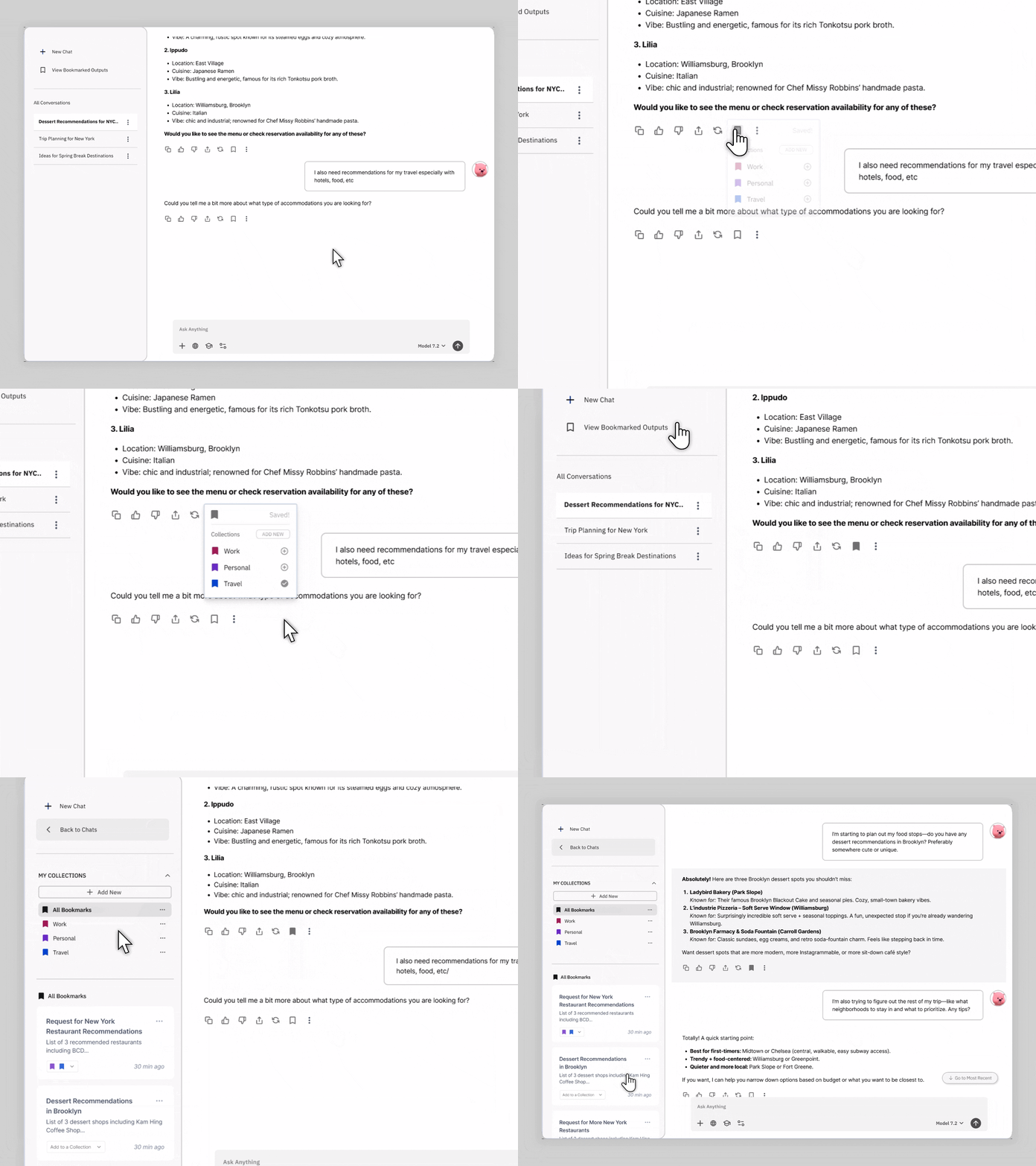
- See the moments they marked as important
- Click any bookmark to jump back to its original location in the chat
- Move fluidly between saved moments and live conversation
Instead of forcing users to scroll or re-prompt to find a meaningful moment, the side panel functions as a lightweight navigation layer — a non-linear index to the conversation.
Organization through collections
Saving outputs is only useful if users can make sense of them over time. Collections provide a flexible way to organize bookmarked outputs — one output can live in multiple categories, and collections can be fluidly renamed, edited, or removed at any time.
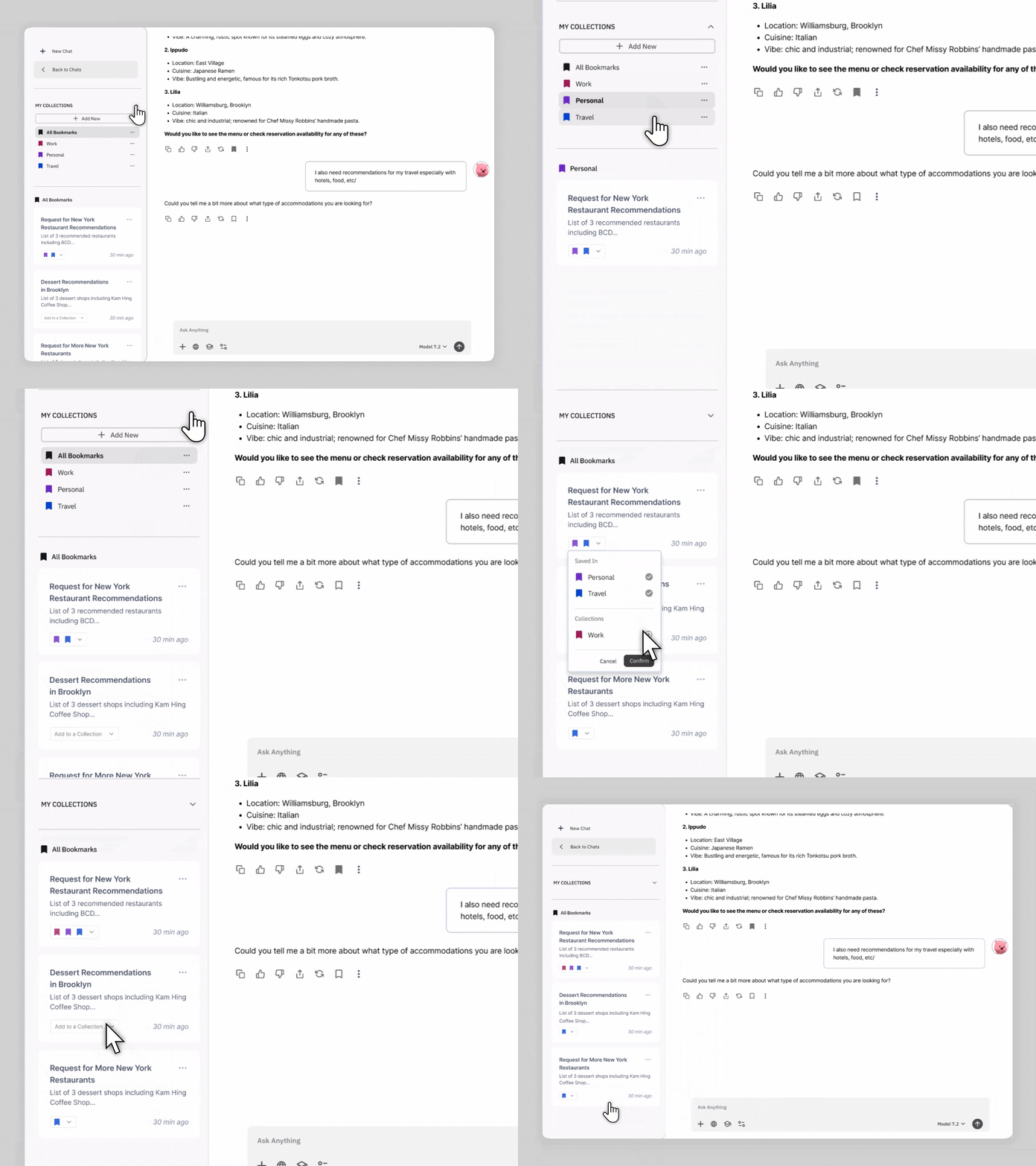
- Users actively reflect on why an output matters
- Organization becomes part of the sensemaking process, not an afterthought
- Collections represent goals, themes, tasks, or open questions
In exploratory or creative work, meaning is personal, provisional, and evolving. Manual collections allow users to decide what a collection represents, when it should exist, and which outputs belong to it.
Directed iteration on outputs
The third element focuses on what happens after something is bookmarked. Instead of treating saved outputs as static endpoints, the system supports directed iteration — allowing users to continue working from specific saved moments rather than restarting.
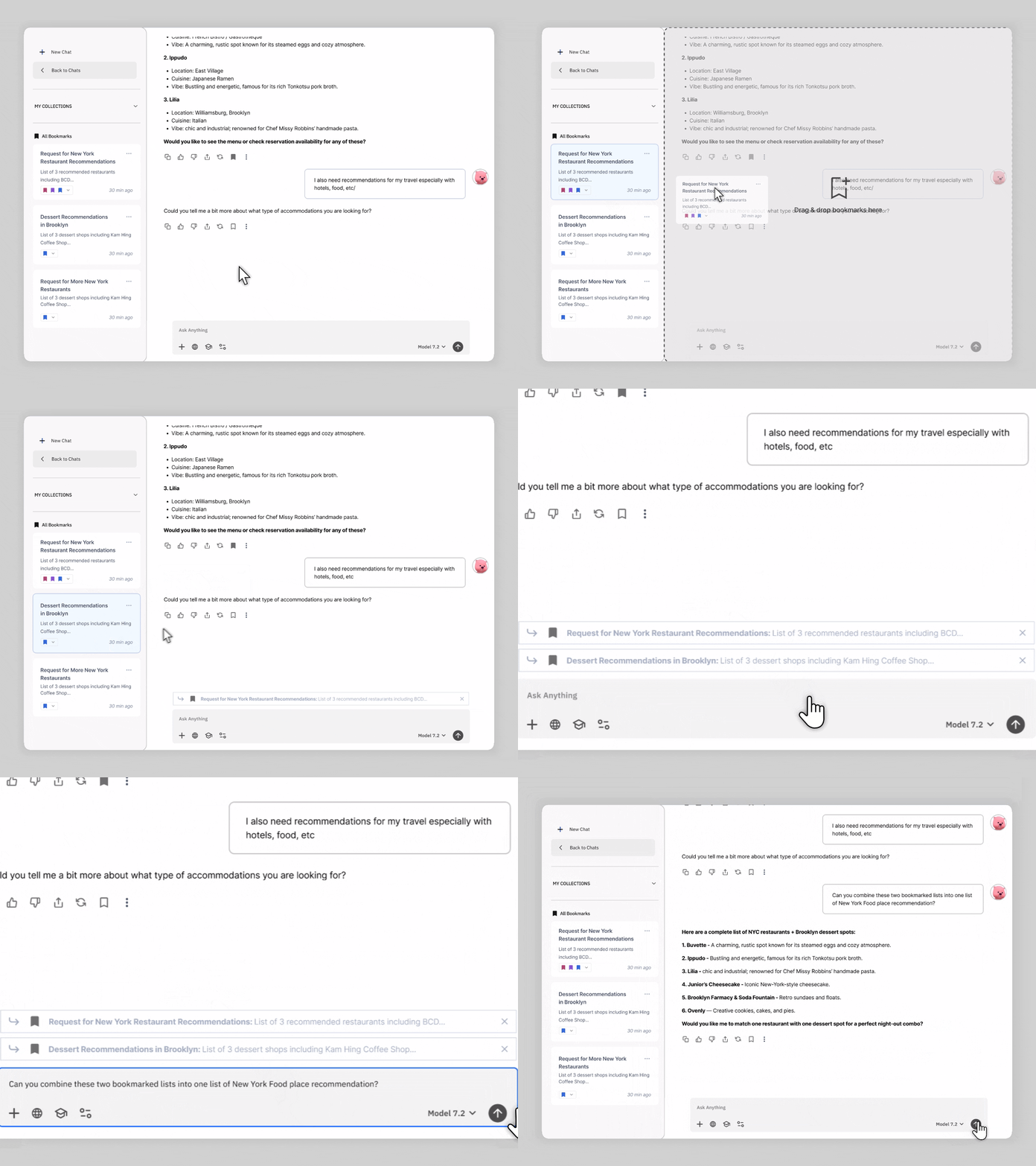
- Re-enter the conversation at that exact point
- Ask follow-up questions grounded in specifically selected outputs as context
Directed iteration reduces rework and preserves user momentum. Instead of reconstructing context that already exists further up in the thread, users can directly build from the exact output they already marked as meaningful.
04 · Design Decisions
Where the design and
user behavior diverged
After converging on a single flow, a second round of Maze testing surfaced two interaction patterns that weren't landing as intended. Each became a deliberate design decision.
Decision 01
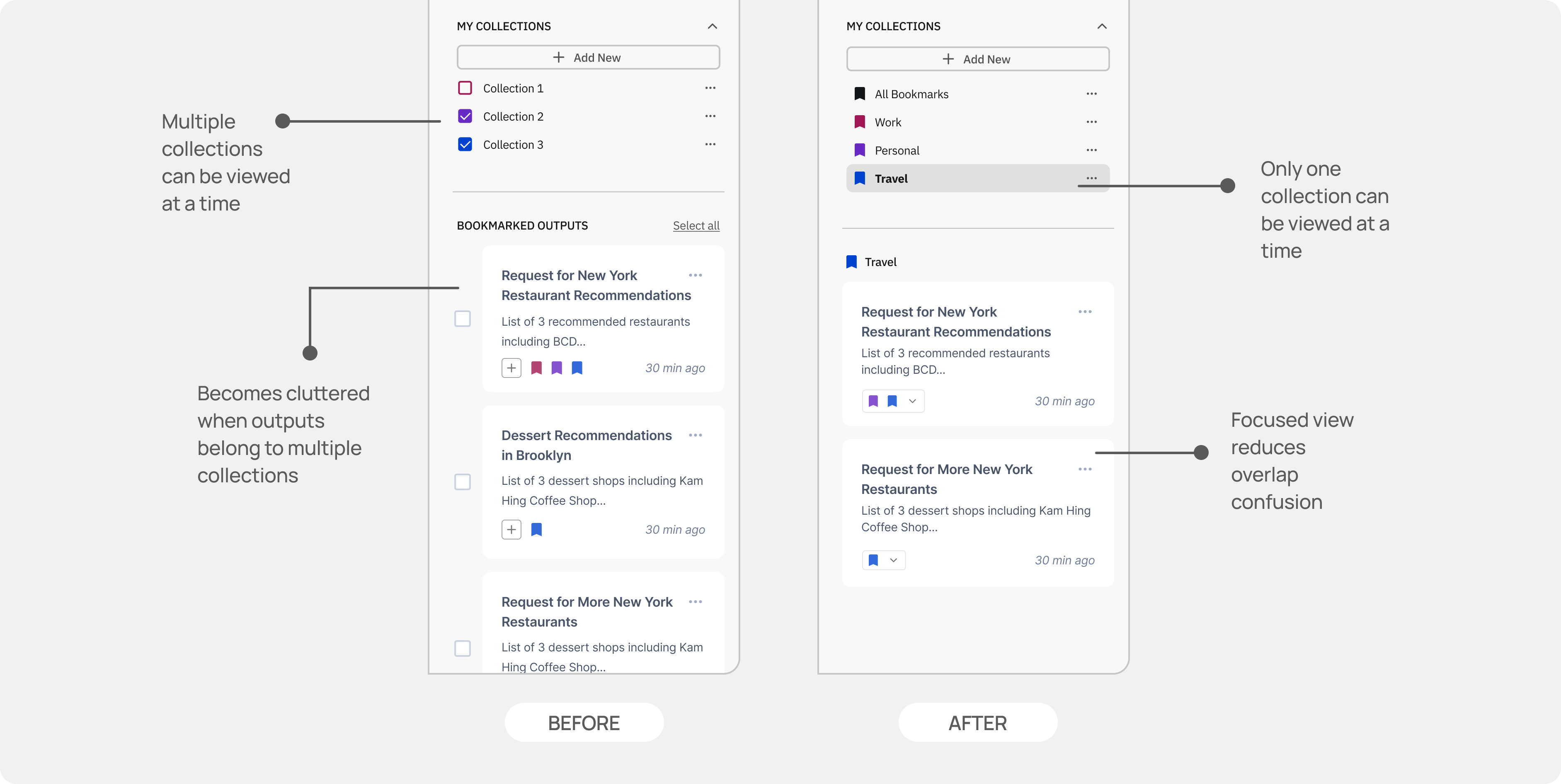
One collection at a time
Finding
When several collections were visible at once, the collections side panel became cluttered and difficult to navigate, especially when outputs are saved into several different collections. The user would once again be faced with endless scrolling to find the right output.
Decision
Only one collection can be viewed and edited at a time. This constraint removes the overhead of 'does this belong to the right collection?' and turns collection use into a focused, intentional act.
Decision 02
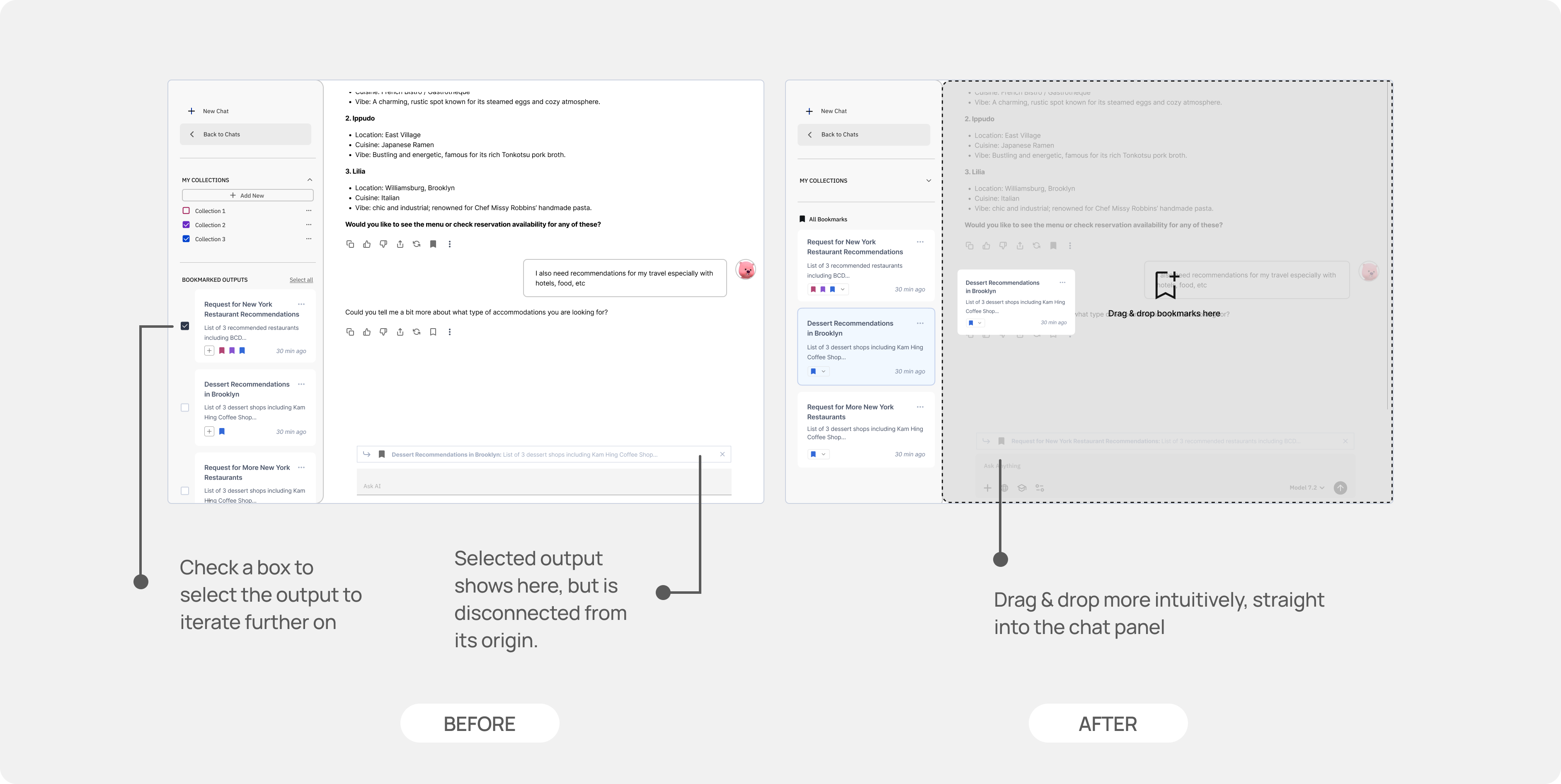
Drag-and-drop over checkboxes
Finding
Users consistently misread the checkbox affordance when reusing saved outputs. The visual language of checkboxes implied editing, not reuse, and the disconnect between the action and its effect in the chat panel created friction in the flow.
“The checkboxes made me think that I was only selecting bookmarks that I wanted to edit some way, not that they were being selected for further prompting.”
User testing participant
Decision
Direct drag-and-drop replaced checkbox selection for pulling outputs into the chat input. The physical gesture of dragging an output into a prompt communicates 'I'm adding this', making the directional relationship between saved content and the active chat feel more tangible.
05 · Future Directions
From linear transcripts to living workspaces
This project focuses on improving conversation flow within current AI chat interfaces, but the larger opportunity lies in rethinking how conversations accumulate value over time — whether through moving away from scrolling as the dominant interaction model or exploring AI-assisted organization flows that preserve user agency.
Together, these directions point toward AI conversations not as linear dialogues, but as living workspaces where ideas can be revisited, recombined, and refined over time.
Takeaways
01
Retrieval beats re-generation
Users' core frustration wasn't getting good outputs — it was finding them again. Interfaces that treat past outputs as recoverable assets, not scroll history, remove one of AI's biggest friction points.
02
Lightweight wins
Bookmarking ranked above branching across both user groups. The more expressive a system, the higher the cognitive overhead. The best interaction here was the one that required the least new behavior.
03
Design for two speeds
Everyday users want automation and quick recall. Power users want depth and control. A single surface can serve both — but only if the default path is simple enough for the former and the ceiling is high enough for the latter.